Home Services About Nasaon Chinasa Joyce Onwe Blog Get Started

Nasaon builds, secures and manages the systems that institutions run on.

Student information portals, academic journal platforms and custom AI — built from scratch, secured, and kept running.

Flagship product Student
Information Portal
Admissions Student records Fees & payment gateways Computer-based exams Results, transcripts & clearance
Academic publishing Academic Journal
Systems
Full OJS setup Peer-review workflows DOI via Crossref Indexing
Custom software AI & Custom
Builds
Chatbots built from scratch Web apps & databases Institutional websites
Student Information Portals Admissions Systems Computer-Based Examinations Student Information Portals Admissions Systems Computer-Based Examinations
Academic Journal Platforms Payment Gateway Integration Custom AI Agents Academic Journal Platforms Payment Gateway Integration Custom AI Agents

Tell us what problem you are trying to solve, and we will help you figure it out.

Start a conversation
Our product

One system, from application
to clearance

Registra runs the full undergraduate lifecycle. Each stage hands off to the next, so a candidate admitted in July is a registered student in August without anyone retyping a name.

Registra — university operations portal covering admissions, student records, fee management, computer-based examinations, results, transcripts and clearance
  1. Apply

    Admissions

    Candidates apply, pay, and upload credentials. Officers assess and decide.

  2. Register

    Student records

    Admitted candidates import straight into the portal. Fees, profiles and course registration.

  3. Examine

    Computer-based exams

    Invigilator-issued codes, hall-controlled sittings, sessions that survive a power cut.

  4. Graduate

    Results & clearance

    Results, transcripts and clearance — the paperwork that decides whether a student leaves.

Inside the admissions system

Built for the officer
doing the work

Not a form that emails a spreadsheet. An assessment desk that does the arithmetic and leaves the judgement to a human.

Aggregate computed, not calculated by hand

JAMB score over eight, plus O'level points, against a cut-off you set. The number appears as the officer enters grades.

One consolidated document

Every upload — results, certificates, photographs — merged into a single paginated file. No opening six attachments per candidate.

The officer still decides

Declared grades are flagged as declared. Verify against the uploaded certificate, then admit, return for correction, or reject.

Return for correction

A candidate with a wrong upload goes back for a fix instead of being rejected. Real registries need the middle option.

Edit-locked export lists

The admitted list and the register export as password-protected Excel, so the file that leaves your office is the file that arrives.

Exports that go somewhere

A CSV that imports into the student portal, a payments file for the bursary, and a Workspace export that creates student accounts in bulk.

Inside the student information system

Everything that happens
after admission

Admissions is a season. The student information system runs every day for the next four years — registration, fees, results, and the documents a graduate needs long after they have left.

Every role has its own seat

HODs, Deans and Exam Officers each get their own access, scoped to what they are responsible for. Results move through the people who are meant to approve them.

Nothing publishes that Senate did not approve

The Exam Officer checks every uploaded result against the Senate-approved record before it moves. The system does not replace your boards — it enforces them.

Your academic structure, modelled

Faculties, departments, programmes, courses, units and requirement areas set up as they exist on paper — so registration and grading follow your own rules.

Enrollment, matriculation, registration

Admitted candidates enroll, receive matric numbers and register for courses by session and semester, with student lookup for anyone who needs to find a record fast.

Transcripts, archive and verification

Transcripts issue from the same record the results live in. Past sessions stay in the archive, and a document can be checked afterwards rather than taken on trust.

Signed, not just submitted

A lecturer signs a result with their signature and a private signing PIN. HODs and Deans sign the same way. An audit log records who did what, and when.

How a result reaches a student

Departmental board, faculty board and Senate approval happen the way they always have. Registra takes over the moment the approved result has to move — and makes sure the version students see is the version that was approved.
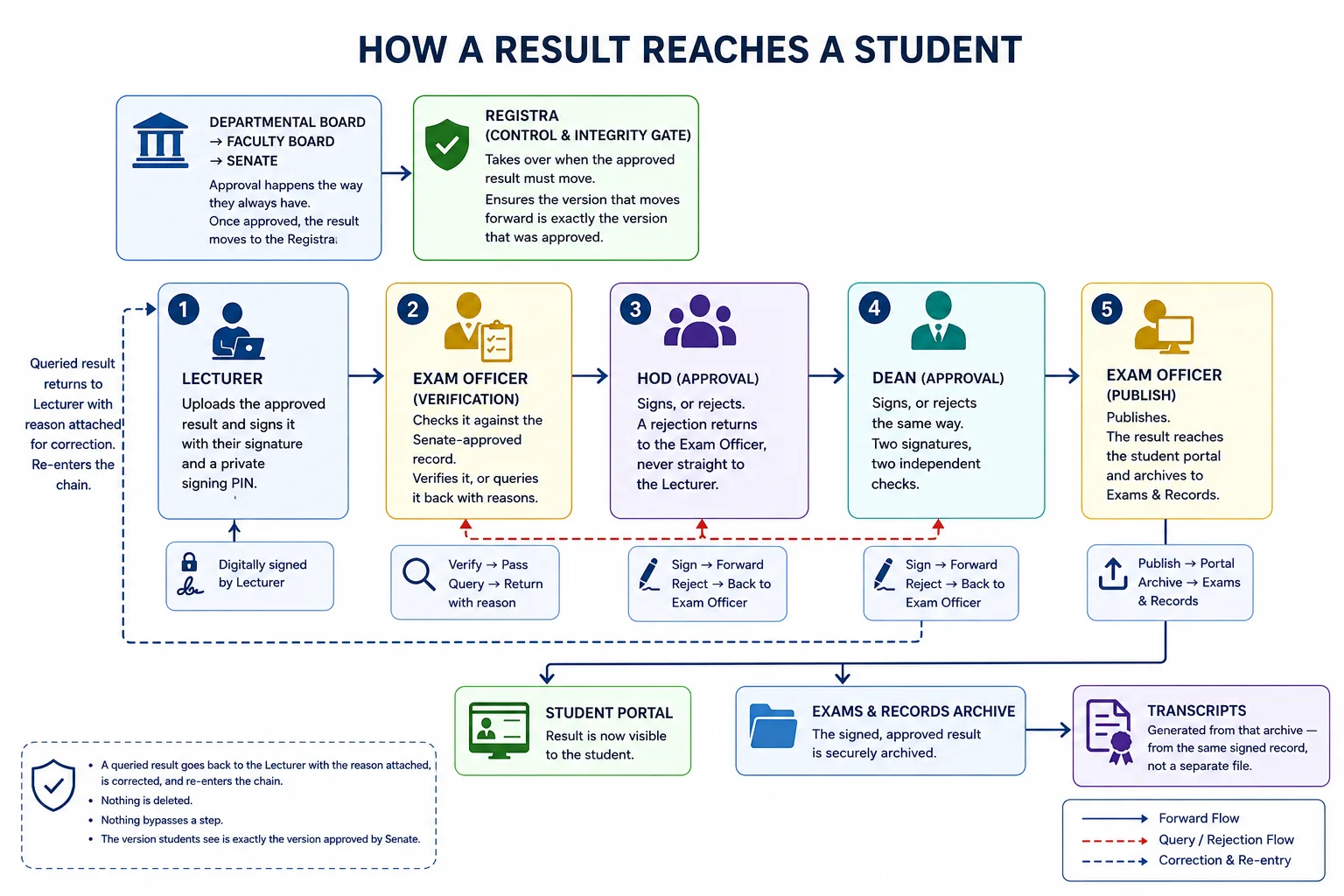
How a result reaches a student: board and Senate approval, then lecturer upload and signing, exam officer verification against the Senate-approved record, HOD and dean signatures, exam officer publication to the student portal and archive, and transcripts generated from that archive.
  1. Lecturer

    Uploads the approved result and signs it with their signature and a private signing PIN.

  2. Exam Officer

    Checks it against the Senate-approved record. Verifies it, or queries it back with reasons.

  3. HOD

    Signs, or rejects. A rejection returns to the Exam Officer, never straight to the lecturer.

  4. Dean

    Signs, or rejects the same way. Two signatures, two independent checks.

  5. Exam Officer

    Publishes. The result reaches the student portal and archives to Exams & Records.

  6. Transcripts

    Generated from that archive — from the same signed record, not a separate file.

A queried result goes back to the lecturer with the reason attached, is corrected, and re-enters the chain. Nothing is deleted and nothing bypasses a step.


Who we work with

The institutions
who trust us

Real systems, on their own domains, in daily use — universities running admissions, records and examinations, and an open-access journal built from nothing to indexed and minting DOIs.

Also built here

Custom software,
not templates

AI agents and chatbots

Built from scratch around how an institution actually works, not a wrapper on a generic assistant.

Institutional websites

Faculty, departmental and corporate sites — custom-built, secured, and structured so search engines can read them.

Web applications and databases

Internal systems for organisations that have outgrown spreadsheets and shared drives.

Working together

How an engagement
actually runs

  1. We look at what you have

    Existing systems, where records live now, and which processes are still on paper.

  2. We scope one thing first

    Usually admissions, because it has a deadline and the pain is measurable. Not a three-year platform plan.

  3. We build it and put it on your domain

    Your subdomain, your branding, your data. Not a tenant on someone else's platform.

  4. We stay through the first cycle

    The first admissions run or exam diet is when problems surface. That is when we are most available.

Tell us what you are
trying to run

Admissions cycle coming up, a journal that has stalled, records still in spreadsheets — say what it is and we will tell you honestly whether we can help.